How to Improve Input Lag in CS2
How to Improve Input Lag in CS2
In esports, every millisecond is critical for victory. However, high system latency often prevents players from winning important duels. At Csgo-news.com, we analyze the best solutions for esports athletes. Therefore, minimal CS2 input lag becomes the main priority for every gamer. In this article, you will learn how to reduce input delay. We will also cover graphics settings, Windows parameters, and hardware solutions. As a result, your gameplay will become smooth and responsive.
What is Input Lag and Why It Matters
First of all, let’s understand the terminology. Input lag is the time between a mouse click and the action on screen. Consequently, high CS2 latency reduces your shooting accuracy. You press the fire button, but the game responds with a delay. As a result, the opponent manages to eliminate you first. For comfortable gameplay, this metric must be minimal. Thus, comprehensive CS2 optimization helps to get rid of micro-stutters.
Player Reviews:
Players often praise the “instant response at low latency”, but note that achieving ideal smoothness without configuring the system can be hard and expensive.
Graphics Card Setup for Low Response Time
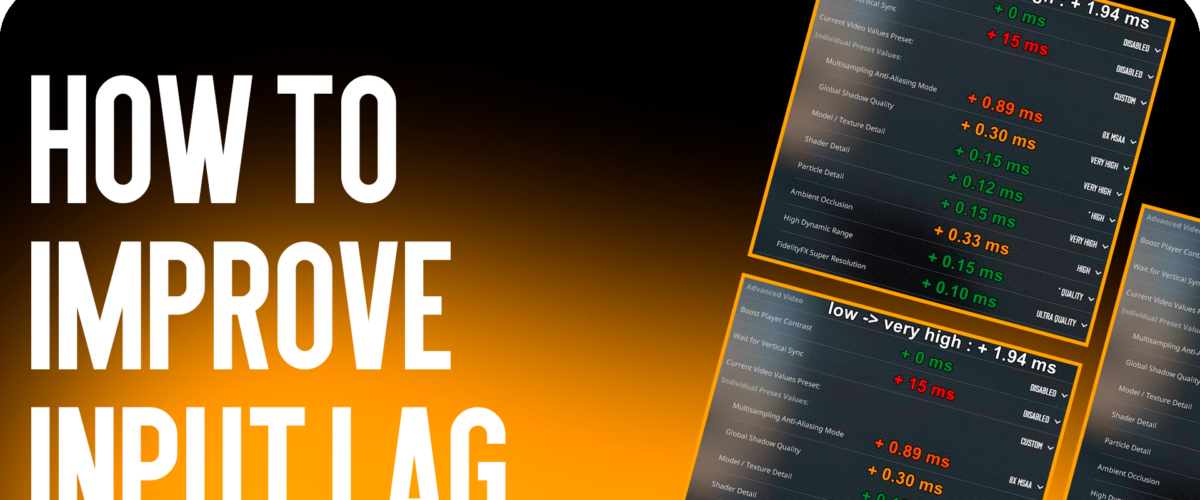
Secondly, proper GPU configuration gives a noticeable speed boost. Therefore, you must update your graphics card drivers. For example, NVIDIA card owners should enable NVIDIA Reflex Low Latency mode. Choose the “Enabled + Boost” option in the settings. In addition, disable vertical synchronization in the control panel. On the contrary, enabling G-Sync can introduce extra latency. For this reason, qualified CS2 optimization always starts with basic graphics parameters.
In-Game Graphics Settings in Counter-Strike 2
Thirdly, in-game settings directly affect latency. To lower input delay maximally, open the options in Counter-Strike 2. Below are the recommended parameters:
-
Display Mode: Fullscreen only.
-
Resolution: Lower resolutions (e.g., 1280×960) reduce CS2 input lag.
-
Vertical Sync: Disabled.
-
Anti-Aliasing: MSAA 2x or Disabled.
-
NVIDIA Reflex Low Latency: Enabled + Boost.
Consequently, minimal graphics settings lower the load on the video card. In addition, you will get higher FPS and a smooth image.
Windows Optimization and Peripheral Drivers
Fourthly, the operating system often runs background processes. Therefore, you need to switch Windows power mode to “High Performance”. Also, disable Game Bar and background video recording. In addition, ensure your mouse polling rate is 1000 Hz or higher. As a result, your CS2 latency will decrease significantly. If you like opening new skins, visit Forcedrop.vip to get the best cases.
Player Reviews:
Users on forums praise “disabling background services for instantly eliminating stutters”, but warn that some Windows services are required for other programs.
Launch Options and Mouse Configuration
Fifthly, CS2 launch options allow you to disable unnecessary engine features. Use the following parameters in Steam: -novid -high -threads 9 +cl_interp_ratio 1
Besides, disable pointer precision enhancement in Windows. This parameter causes unpleasant mouse acceleration. Thus, your mouse will work predictably and fast. As a result, system CS2 input lag will drop to a minimum. Consequently, hitting opponents will become much easier.
FAQ — Frequently Asked Questions
How to check my CS2 input lag?
You can use the built-in NVIDIA Performance Overlay. In addition, latency can be measured using system utilities like CapFrameX.
Does CS2 optimization help increase FPS?
Yes, reducing system load increases frames per second. As a result, a smoother image lowers overall input latency.
Why does high CS2 latency hinder gameplay?
Because player actions appear on screen with a delay. Consequently, the opponent gets a reaction time advantage.
Time to make a choice
In conclusion, regular system tuning allows you to achieve maximum results in esports. If you want to learn more about updates and guides, read the expert portal Csgo-news.com. Apply the described tips, update drivers, and disable background programs. As a result, you will forget about lag and raise your rank with comfort.
👉 Want to know more? Read here